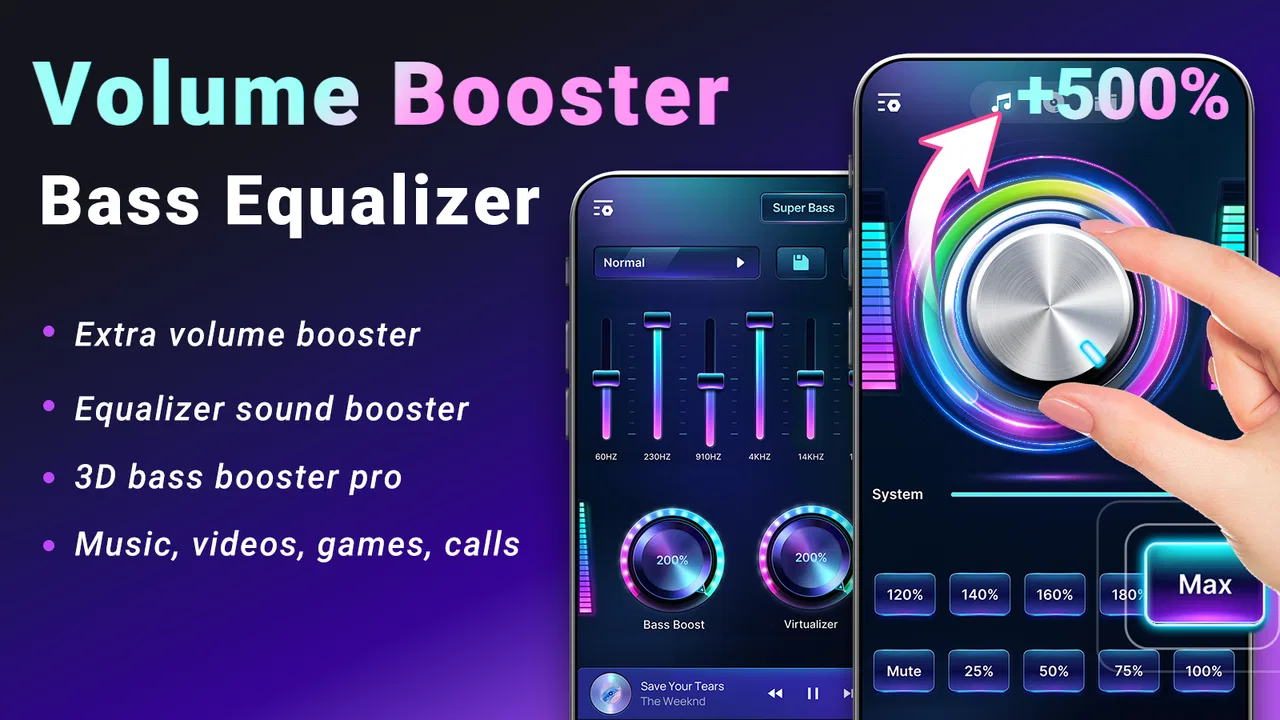
Volume Booster Bass Equalizer
- 4.5
- Rating
- 1.00M
- Installs
- Free
- Price

 Analysis by App-foxy
When an app promises louder sound, I immediately become cautious. More volume is not automatically better, and a badly adjusted booster can make music harsh, distort voices, or push a phone speaker beyond what it handles comfortably. After spending time with Volume Booster Bass Equalizer, I found that its real value is less about keeping everything at maximum and more about giving me quick control over playback when the phone, headphones, or room is not cooperating.
This is a free music and audio app from Echo Player - Music, MP3 & Equalizer. It is designed for volume amplification, equalizer adjustments, and sound effects, so it sits between a straightforward volume booster and a compact listening-control tool. The app is rated for Everyone, runs on Android 5.0 and later, and its current version is 1.1.21. It has reached over one million installs, with a 4.5 average from around eight thousand five hundred ratings and three hundred six written reviews.
How it fits into a shared household
The most convincing use case for me was not a party or a dramatic speaker upgrade. It was an ordinary household moment: one person wants to listen to a podcast in the kitchen, another is watching television nearby, and the phone speaker sounds too quiet at its normal setting. A small boost can make speech easier to follow without immediately reaching for an external speaker. That is where this app feels practical.
You May Also Like

 Blood Strike: 2.5 Anniversary
Blood Strike’s Loadouts Turn Every Drop Into a Tactical Gamble
A close look at Blood Strike’s custom loadouts: how fast access to signature weapons reshapes its battle royale rhythm, rewards preparation, and narrows the gap between fights.

 Pandora - Music & Podcasts
Pandora’s Music Is Easy to Start, but Harder to Recover
Pandora’s strength is its low-effort path from a seed to a station. Its weak spot is how much confidence it asks you to place in connection, setup, and quiet recovery.

 8 Ball Pool
 Is Built on Rivalries, Rematches, and Routine
A close look at the rivalries, rematches, shared routines, and unanswered safety questions that turn a quick pool match into a persistent mobile community.

 Samsung Music
’s Quiet Strength Is Playing What You Already Own
Its reach comes less from spectacle than from dependable access to a personal library. That simplicity is both the app’s strongest retention engine and its ceiling.

 AccuWeather: Weather Radar
AccuWeather Review: A Quick, Clear Forecast for Everyday Decisions
For everyday plans, the best forecast is the one you can understand quickly. AccuWeather makes rain timing, radar, and local conditions easy to act on, with a few trade-offs.

 Hill Climb Racing
Why Hill Climb Racing Still Turns Crashes Into One More Run
A tiny car, a bumpy hill and one more upgrade: Hill Climb Racing keeps resurfacing because its simple chaos makes every near-miss feel personal.
More From Our News Desk



It can also help when different people use the same phone for different listening habits. One person may prefer stronger bass for music, while someone else may need clearer speech for an audiobook or video. Instead of treating the device’s standard volume buttons as the only control, the app gives the listener another layer of adjustment. The important word is “another.” It does not turn a small phone speaker into a full audio system, and it cannot remove the physical limits of the speaker.
For shared devices, I would treat every adjustment as temporary unless I have deliberately checked what the next listener will inherit. A high level that seems acceptable for a quiet room may be unpleasant when earbuds are connected later. This is one of the less obvious practical issues with any booster: the setting that solves one person’s problem can become a surprise for the next person.
My advice is simple. Before handing the phone to somebody else, lower the amplification and check the ordinary system volume. That small habit matters more in a family or shared flat than it does on a personal device, because the next listener may not know that an extra layer of volume is active.
What the first setup feels like
The app is easy to understand because its purpose is narrow. I did not have to learn a complicated music library or build a new listening service around it. The useful controls are the ones connected to loudness and tone: amplification for making playback more present, equalizer adjustments for changing the balance, and sound effects for shaping the character of the output.
That simplicity is a strength, but it also creates a responsibility. A booster is not a magic repair for every quiet recording. If a track is mastered softly, increasing the level may help. If the recording is already aggressive, adding more gain can make it tiring rather than clearer. I found that modest changes are usually more useful than immediately moving every control as far as possible.
For a first setup, I would begin with the app’s normal audio output, play something familiar, and raise the level gradually. Speech is a better test than a bass-heavy song because it reveals whether the change improves intelligibility or merely makes the sound louder. I would then try music and listen for crackling, flattened dynamics, or a bass line that overwhelms vocals.
The same approach works when several people share the phone. Let each person choose a comfortable listening level, but keep the adjustment conservative when headphones may be used afterward. The app is most useful when it gives a little extra headroom, not when it is treated as a permanent instruction to listen at maximum volume.
Keeping personal preferences separate
One limitation becomes clear in a shared-device setting: an audio adjustment is tied to the device and listening session, not to a person’s identity. If I tune the sound for myself and somebody else picks up the phone, that person may hear the same altered balance. The app is therefore better for quick, hands-on control than for managing separate household profiles.
This is not a criticism of a feature the app claims to provide; it is simply the boundary I would keep in mind before installing it on a family tablet or a phone used by several people. If every listener needs a carefully preserved personal equalizer, a dedicated music player with profile support may be a better fit. Volume Booster Bass Equalizer is more appealing when the goal is immediate adjustment rather than a collection of individualized audio accounts.
A useful household routine is to choose one neutral setting as a starting point. I would avoid leaving an extreme bass or treble change active, because the next person may mistake the altered sound for a problem with the recording or the speaker. Returning to a balanced position after listening makes the app less disruptive for everyone else.
Coordinating music, speech, and quiet hours
Shared listening is not only about volume. It is also about coordination. A boost that helps one person hear a spoken tutorial while cooking may be inappropriate late at night, when the better solution is headphones or a lower level. The app can make sound more noticeable, but it cannot decide when that sound is considerate in a shared space.
I especially liked thinking of the equalizer as a clarity tool rather than a “more bass” button. For spoken content, excessive low end can make voices feel muddy on some small speakers. A restrained tonal adjustment may make the words easier to follow without raising the overall level as much. That can be more comfortable for other people in the room and less demanding on the listener’s ears.
For music, the trade-off changes. Bass enhancement can make thin playback feel fuller, but it may also expose rattling or distortion from a phone speaker. If that happens, I would reduce the boost before increasing the main volume. This is a concrete difference between using the app thoughtfully and simply chasing loudness: the equalizer can sometimes solve a balance problem that amplification alone cannot.
Another practical scenario is a shared car, although the phone’s output may be routed through a vehicle system rather than its built-in speaker. In that situation, I would test the app at a low setting first, because the car’s own controls may already provide amplification and tone shaping. Stacking several boosts can produce an unpleasant jump in level when playback begins.
Age, trust, and responsible use
The Everyone content rating makes the app broadly suitable from a store-rating perspective, but that should not be confused with unlimited listening being appropriate for every child. A volume booster can make it easier to reach uncomfortable levels, especially when a young listener uses headphones without an adult nearby. I would be comfortable letting a child use the app only with a clear household rule: start low, avoid maximum amplification, and stop if the sound feels sharp or uncomfortable.
There is also a trust issue with shared devices. If a child changes the sound settings and leaves them active, an adult may connect headphones later without realizing that the boosted output is still in effect. I would check the audio state before switching from the phone speaker to earbuds, particularly when the device moves between family members.
The app is not the right answer for a household looking for detailed supervision or separate child audio settings. Its value is direct control, not family administration. Parents who need a carefully managed listening environment should combine ordinary device safety habits with suitable headphones and supervision rather than relying on a booster to make the decision for them.
For adults sharing a phone, the same principle applies in a less formal way. Trust the person using the device to adjust gradually, but do not assume that a setting left by one listener will suit another. The safest workflow is to treat every handoff as a reset point.
Where the equalizer earns its place
The equalizer is the part that makes this more interesting than a single-purpose loudness control. In my experience, different content benefits from different priorities. Spoken audio usually needs intelligibility, music may benefit from a more pleasing tonal balance, and older or poorly recorded files can require a gentler approach than modern tracks.
The non-obvious trade-off is that equalization cannot create detail that is absent from the source. Raising a frequency range may make one part stand out, but it can also cover another part. For example, stronger bass may make a song feel more energetic while pushing vocals backward. If the aim is to hear lyrics clearly, a smaller change can be more successful than a dramatic bass setting.
I would use a familiar recording as a reference instead of adjusting by guesswork. Play a short section, make one change, and listen again. Changing several controls at once makes it difficult to know what helped. This slow method is particularly useful for a shared phone because it produces a more neutral result that other listeners are less likely to dislike.
There is a good reason to compare it with the usual alternatives. A phone’s built-in audio controls are faster and generally safer for basic volume changes, while a dedicated music player may offer deeper library management and saved sound profiles. An external Bluetooth speaker is the better choice when the real problem is room coverage. This app is strongest in the middle: I can improve the listening experience without carrying another device, but I should not expect it to replace better hardware or a full-featured player.
Everyday friction and limits
The biggest limitation is inherent to amplification. If the original signal is noisy, boosting it also makes the noise more obvious. If the speaker is already near its comfortable limit, extra gain may cause distortion instead of useful clarity. That means the app rewards restraint, and users who want a dramatic increase may be disappointed by the physical limits of their phone or headphones.
I also would not use it as a substitute for repairing a faulty device. A blocked speaker grille, damaged headphones, or an audio file with a very low recording level may need a different solution. The app can adjust playback, but it cannot correct every hardware or source problem.
Another point of friction is shared-state confusion. When several people use one device, it is easy to forget that an equalizer or amplification change remains active. I recommend a quick check whenever the output changes from speaker to headphones, from quiet room to noisy room, or from one listener to another. That check takes less time than recovering from an unexpectedly loud start.
The free price makes experimenting easy, and the broad Android compatibility is helpful for older phones that still run Android 5.0 or later. At the same time, older hardware may have weaker speakers or less consistent audio behavior, so the app’s usefulness will depend on the phone as much as on the controls. I would judge it by whether it improves a specific listening problem, not by expecting the same result on every device.
Who should install it and who should skip it
I would recommend Volume Booster Bass Equalizer to someone who regularly finds that speech is difficult to hear on a phone, wants quick tonal adjustment for local playback, or shares a device and needs more control than the standard volume buttons provide. It is also a reasonable low-risk experiment for listeners who understand that small adjustments are usually better than extreme ones.
I would skip it if the main goal is a complete music-management system, carefully separated user profiles, or a guaranteed room-filling speaker experience. A dedicated audio player may be better for organized collections and repeatable presets. A proper speaker is better for groups. The phone’s own controls are better when all I need is a simple, predictable volume change.
I would also be cautious if I mainly use sensitive headphones or hand the device to young children. In those cases, the convenience of extra amplification is outweighed by the need for careful supervision and consistent settings. The app is not inherently unsuitable, but it makes responsible habits more important.
My household verdict
After using it as a practical audio adjustment tool, I see Volume Booster Bass Equalizer as a useful companion rather than a complete listening solution. Its appeal comes from combining amplification, equalizer control, and sound effects in one focused app, while remaining free and accessible to a wide range of Android users. The controls can help with quiet speech, thin playback, and changing listening conditions.
My recommendation is to install it for a specific reason, then keep the setup conservative. Start with speech, make one change at a time, and reset the sound before another person uses the device. In a household, those habits matter just as much as the app itself.
The developer, Echo Player - Music, MP3 & Equalizer, has positioned this as a straightforward audio utility rather than a full community or family platform. That focus works for me. I would not choose it to replace good headphones, an external speaker, or a sophisticated music player, but I would keep it in mind when a phone’s ordinary output needs a little help.
My final take: this is a practical free volume and tone tool for everyday Android listening, especially when several people share one device and audio needs change from moment to moment. Its best results come from moderate adjustments and clear household boundaries. If you want controlled, convenient sound shaping without adding hardware, it is worth trying; if you want powerful profiles, deep music organization, or hands-off safety controls, a different kind of audio solution will serve you better.
FAQs for Volume Booster Bass Equalizer
01What is Volume Booster Bass Equalizer and what does it do?
Volume Booster Bass Equalizer is an audio-enhancement app designed to make music, videos, games, podcasts, and other media sound louder and more balanced. It typically combines a volume amplifier with bass boost and an equalizer containing adjustable frequency bands. After installation, users can fine-tune the sound profile, choose presets, and adjust the effect to match headphones, speakers, or the device’s built-in audio output.
02Is Volume Booster Bass Equalizer compatible with Android and iOS devices?
Compatibility depends on the specific version and publisher of the app, so it is important to check the official store listing before downloading. Some volume booster and equalizer tools are released only for Android, while similar apps may be available for iPhone and iPad with different system limitations. Review the required operating-system version, supported devices, and recent user feedback to confirm that it will work properly on your phone or tablet.
03Can Volume Booster Bass Equalizer make my music louder than the phone’s normal limit?
The app may increase perceived loudness beyond the standard system setting by applying software amplification, but the actual result depends on your device, media player, headphones, and operating-system restrictions. Increasing the level too much can cause distortion, clipping, or an unpleasant sound, especially with inexpensive speakers. For the clearest results, raise the volume gradually and use moderate bass and equalizer settings instead of maximizing every control.
04Does Volume Booster Bass Equalizer work with streaming apps, games, and videos?
It may work with many audio sources, including music players, video applications, games, and locally stored media, but performance can vary between devices and apps. Some platforms restrict background audio processing or use their own sound controls, which can reduce the effect. During testing, users should try several types of content and check whether the booster remains active when switching applications, locking the screen, or connecting Bluetooth headphones.
05Is Volume Booster Bass Equalizer safe to use for my phone and hearing?
The application itself is generally intended to adjust audio through software, but excessive amplification can create risks. Very loud sound may damage headphones, cause speaker distortion, drain the battery faster, or contribute to hearing discomfort and long-term hearing loss. Use the lowest volume that provides a satisfying result, avoid prolonged listening at maximum levels, and stop immediately if you notice ringing, pain, muffled hearing, or unusual speaker vibrations.
Pros
- Boosts volume and bass with simple
- accessible controls.
- Built-in equalizer helps customize sound for music
- videos
- and games.
- Presets make it easy to switch between different listening styles.
- Works with headphones
- speakers
- and many media players.
- Compact interface uses little storage and is quick to open.
Cons
- Excessive amplification can cause distortion or muffled audio.
- Results vary depending on the phone
- headphones
- and media app.
- May increase battery usage during extended playback sessions.
- Some features may require ads or in-app purchases.
- High volume levels can damage hearing or connected speakers.

Volume Booster Bass Equalizer
Gallery